Use Markets to price when a campaign's discount must apply to a particular Shopify Market. This setting controls the campaign's Price change effect.
Choose base prices or specific markets
Leave Markets to price at Base prices (all markets) to discount your store's base prices. Markets that use automatic currency conversion or a percentage adjustment follow the base-price change. A market with its own fixed prices can override the base price for some products, so those buyers may not see the sale price.
To discount a market with its own price list, select that market in Markets to price. The campaign writes a sale price to the selected markets only; it leaves base prices unchanged. If a selected market normally uses a percentage adjustment from base prices, its campaign price becomes fixed until the sale is reverted, so it will not follow later base-price or exchange-rate changes during that time.
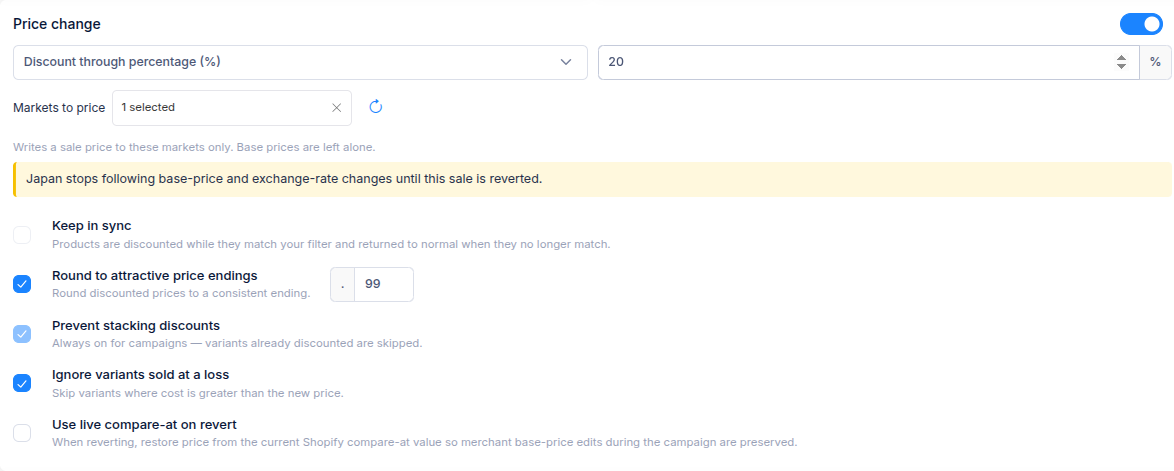
For example, a base-price sale can reach buyers in markets that convert your base price automatically. If your Japan market has fixed prices for some products, select Japan to discount those prices instead.
Set up a market-specific campaign
- Create a sales campaign and turn on Price change.
- Choose the discount type and enter its value.
- Open Markets to price and select the markets to discount.
- Under Targeting, choose and preview the products or variants.
- Check the market prices in the preview, then review the Summary and create the campaign.
A percentage discount can work across markets with different currencies. For a fixed amount off or a new price, select markets that share a currency; the form will stop you if their currencies conflict. A market using automatic conversion has no separate price list to select, so edit base prices to reach it.
Keep in sync cannot be combined with selected markets. If you need variants to enter or leave a campaign as a filter changes, use Keep sales campaign products in sync with base prices instead.
If you have questions, use the chat button in the corner or email help@ouiteo.com.