
Discounts move products. But the wrong discount can train shoppers to wait for the next sale, erode your margins, and devalue your brand. According to a 2025 Shopify merchant survey, stores that rely on site-wide percentage-off sales see an average 18% drop in full-price sell-through within six months.
The difference between merchants who use discounts profitably and those who don't isn't how deep they cut — it's how strategically they structure their promotions. This guide covers seven pricing and discount strategies that help you move inventory, acquire customers, and protect your bottom line.
On this page
- 1. Tiered discounts that increase average order value
- 2. Time-limited campaigns that create real urgency
- 3. Segment-specific pricing for different customer groups
- 4. Bundle pricing to move slow movers with best sellers
- 5. A markdown cadence that protects margins
- 6. Compare-at pricing and anchoring psychology
- 7. Scheduled campaigns that run themselves
1. Tiered discounts that increase average order value
A flat "20% off everything" sale is easy to set up but leaves money on the table. Tiered discounts reward shoppers for spending more — and they work.
Common structures:
- Spend $75, get 10% off
- Spend $150, get 15% off
- Spend $250, get 20% off
The psychology is straightforward: shoppers who are close to the next tier will add another item rather than miss out. This moves your average order value up while keeping the deepest discounts reserved for your highest-value transactions.
When to use it: Seasonal campaigns, inventory clearance events, or any period where you want to push volume without discounting your hero products at a flat rate.
2. Time-limited campaigns that create real urgency
Urgency works — but only when it's genuine. A "limited time offer" banner that runs for three weeks teaches shoppers to ignore it. A 48-hour flash sale with a visible countdown timer creates a real decision window.
Effective time-limited campaigns share a few traits:
- A clear start and end time communicated upfront
- Visual urgency cues (countdown timers, "ends tonight" messaging)
- Tight product scope (a specific collection or category, not everything)
- Automatic price reversion when the campaign ends
The last point matters more than merchants realise. Manually reverting prices after a sale invites errors — products left at sale price erode margins quietly. Automating the start and end of campaigns removes that risk entirely.
With Sales Discount Manager, you can schedule campaigns with automatic price changes and countdown timers that switch on and off without manual intervention.
3. Segment-specific pricing for different customer groups
Not every customer should see the same price. A first-time visitor needs a different incentive than a loyal repeat buyer.
Consider segmenting your discounts:
- New customers: A welcome discount (10-15% off first order) to reduce purchase hesitation
- Returning customers: Early access to sales or exclusive pricing tiers
- High-value customers: VIP pricing or free shipping thresholds that reward loyalty
- At-risk customers: Win-back offers for customers who haven't purchased in 60-90 days
This approach keeps your margins healthier because you're only discounting where it changes behaviour. A repeat customer who buys at full price doesn't need a discount — but an at-risk customer might need one to come back.
How to implement: Use Shopify's customer tags and segments alongside your discount tool to target the right groups with the right offers.
4. Bundle pricing to move slow movers with best sellers
Bundling pairs products that sell well with products that need help. The customer perceives value ("I'm getting more for less"), and you move inventory that might otherwise sit until clearance.
Effective bundle strategies:
- Complementary bundles: Products that naturally go together (a top + bottom, a device + accessories)
- Starter kits: Curated sets for new customers exploring your brand
- Threshold bundles: "Buy 3, get the cheapest free" structures that increase units per transaction
The key is pricing the bundle so it feels like a deal without deeply discounting the anchor product. A 15% bundle discount on a $120 set feels meaningful to the shopper, but if your best-selling item in the bundle retails at $80, you're really only discounting the add-on.
5. A markdown cadence that protects margins
Clearance doesn't have to mean a single deep cut. A structured markdown cadence gives products multiple chances to sell at progressively lower prices — capturing different buyer segments at each stage.
A common cadence:
- Week 1-2: 15% off — captures deal-seekers who don't need the deepest discount
- Week 3-4: 25% off — captures the next tier of price-sensitive shoppers
- Week 5+: 40% off — final clearance to move remaining units
This approach recovers more margin on early units and reserves the deepest cuts for what truly needs to go. It also creates a natural urgency: shoppers learn that prices go down over time, but sizes and selection shrink too.
Pro tip: Automate each stage of the cadence with scheduled price changes so your team doesn't have to manually update prices every week. Tools like Sales Discount Manager let you set this up once and let it run.
6. Compare-at pricing and anchoring psychology
Shopify's built-in "compare at" price field is one of the most underused merchandising tools. When a product shows a crossed-out original price next to the current price, it activates price anchoring — the shopper evaluates the deal relative to the higher number.
Best practices for compare-at pricing:
- Be honest: The compare-at price should reflect a real previous price, not an inflated number. Shoppers (and regulators) notice.
- Use it selectively: If every product shows a compare-at price, the signal loses its power. Reserve it for genuine markdowns and promotions.
- Pair it with sale badges: A visual "SALE" tag on the collection page draws the eye before the shopper even sees the price. This is especially effective on mobile where product cards are scanned quickly.
- Set and revert automatically: When a campaign ends, compare-at prices should revert cleanly. Leaving stale sale indicators damages trust.
With Sales Discount Manager, you can bulk-update compare-at prices across collections and schedule automatic reversion, plus add sale badges that appear only during active campaigns.
7. Scheduled campaigns that run themselves
The most common mistake in discount management isn't the strategy — it's the execution. Prices that don't update on time, campaigns that run a day too long, sale badges left on products at full price. Every manual step is a potential error.
A scheduled campaign workflow looks like this:
- Plan: Decide which products, what discount, and what duration
- Set up: Configure price changes, compare-at prices, sale badges, and countdown timers
- Schedule: Set the start and end date/time
- Launch: The campaign goes live automatically — prices change, badges appear, timers start
- End: Prices revert, badges disappear, timers stop — no manual cleanup
This approach is especially valuable for merchants running multiple campaigns simultaneously (e.g., a flash sale on one collection while a seasonal discount runs on another). Overlapping campaigns are nearly impossible to manage manually without errors.
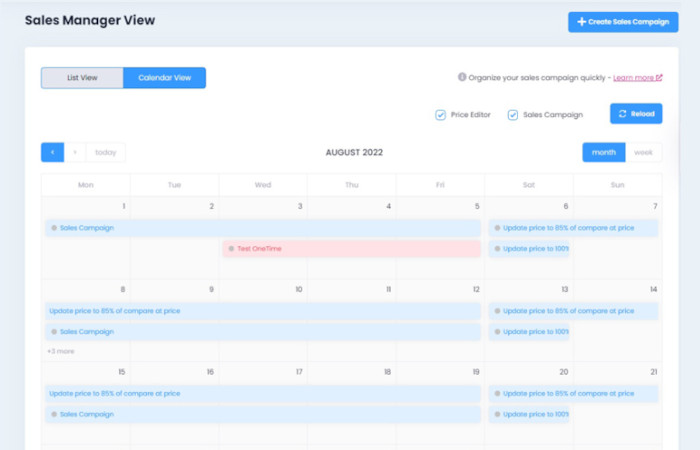
A visual campaign calendar helps you see what's running, what's upcoming, and where campaigns might conflict. Sales Discount Manager provides a drag-and-drop calendar view so you can plan and schedule promotions without spreadsheets.
Bringing It Together
Discounts are a tool, not a strategy by themselves. The merchants who use them well think about pricing as a system: tiered incentives to grow order value, time-limited campaigns to create urgency, segmented offers to target the right customers, and structured markdowns to protect margins.
The common thread across all seven strategies is intentionality. Every discount should have a clear goal — acquire a customer, move specific inventory, increase order size, or reward loyalty. If you can't name the goal, the discount is probably costing you more than it's earning.
And the operational side matters just as much as the strategic side. Automating campaign scheduling, price changes, and visual merchandising elements (badges, timers, compare-at prices) removes the manual errors that quietly eat into your margins.

Sales Discount Manager
Schedule promotions with a drag-and-drop pricing calendar, countdown timers, sale badges, and automatic price reversion.